Samsung Refrigerator 14E Error Code
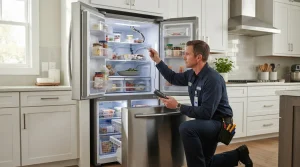
14E is an ice maker sensor error on a Samsung refrigerator, one of the codes owners see most often.

Specialized Samsung Appliance Repair in San Francisco
Mon–Sat: 8:00 AM – 7:00 PM
A 25 cu ft Family Hub French-door model whose touchscreen and connectivity add their own set of symptoms.

The RF27CG5900SRAA sits in the Family Hub series, a French-door refrigerator that Samsung lists as current at 25 cu ft. A screen on the door changes what can go wrong: besides cooling, owners report a frozen display, a screen that will not wake, or an app that stops talking to the unit.
If the screen is dark but the compartments stay cold, the refrigerator may still be keeping food safe, so check temperatures by touch before panicking. If both the display and cooling misbehave together, a power disruption is a common thread. See codes 41 and 42, where the Family Hub display is not responding properly and the interior lights blink blue, and 41C, which applies to 3-door French-door Family Hub models only. See also blank display and unresponsive touch controls.
Owner checks here are simple: confirm your router is on, look at the signal where the refrigerator stands, and reconnect from the SmartThings app. Access Point mode (AP) is used during Wi-Fi setup and is not a fault. If the screen is fine but commands fail, read SmartThings commands failing while the appliance shows online. We do not fix connectivity remotely.
We confirm the model, diagnose before repair and put a written estimate in your hands. Work starts only after you approve. Details on Samsung refrigerator repair and the wider Samsung refrigerators guide.
Connected appliances sometimes restart themselves or sit on a screen that looks frozen while software settles. Give it a short while on a steady supply before assuming a fault. If the screen returns to normal, the app can be paired again from your phone. If it keeps rebooting or shows blinking lights, that pattern is what we want you to tell us about when you book. It helps to know whether the problem began after a storm, a trip, a router change or a move.
Landlords and property managers can pass the model number and the symptom to us directly; we still need an adult at the unit to approve the written estimate.
Yes. This is a current French-door refrigerator of 25 cu ft in the Family Hub series.
Codes 41 and 42 are listed as the Family Hub display not responding properly, shown with blinking blue interior lights. Note the pattern and book a diagnosis if a reset does not clear it.
It can fix the app connection, but not a dead or frozen display. Treat them as two separate problems.
We can point you through owner checks like router status and reconnecting in the app. If the refrigerator itself shows a hardware fault, that is what the visit covers.
Model-information disclaimer. Confirm your exact model number and specifications with your appliance documentation before booking a repair. Model pages are for identification and compatibility reference.
Diagnosis for Samsung French-door, side-by-side and top-freezer refrigerators in San Francisco and the Bay Area, from warm compartments to ice makers.
The RF27CG5B30SRAA is a current Bespoke French-door refrigerator listed at 26 cu ft. Fan noise and frost are the complaints we see…
The RF32CG5900SRAA is a current Family Hub French-door refrigerator listed at 30 cu ft. Power disruptions, the door screen and communication faults…
The RF32CG5B30SRAA is a current Bespoke French-door refrigerator listed at 31 cu ft. Warm food compartments and compressor-related codes are the main…
The RF32CG5D00SRAA is a current Bespoke French-door refrigerator listed at 32 cu ft. Door seals, condensation and alarms are what most owners…
The RS22T5561SR/AA is a current Family Hub side-by-side refrigerator listed at 22 cu ft. Freezer frost and the door screen are the…
The RS23CB7600QLAA is a current Bespoke side-by-side refrigerator listed at 23 cu ft. Dispenser leaks and filter questions bring most calls.
The RS27T5561SR/AA is a current Family Hub side-by-side refrigerator listed at 26.7 cu ft. Ice maker sensor codes and freezer frost are…
The RS28CB760012AA is a current Bespoke side-by-side refrigerator listed at 28 cu ft. New noise and uneven cooling are what prompt most…
Share a few details and we’ll confirm an appointment. Prefer to talk? Call us and we’ll help right away.